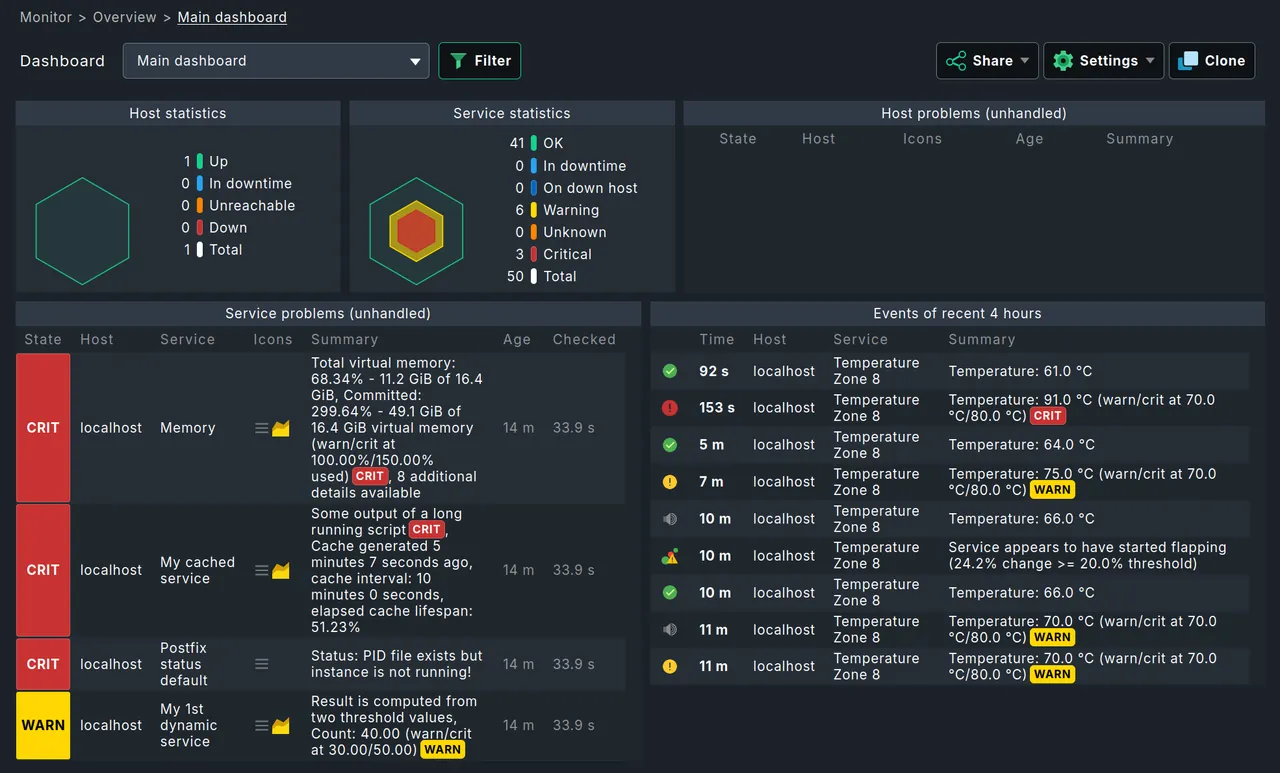
Picture starting from an empty Ubuntu VM: install the agent, add the host, and Checkmk’s service discovery can typically show fifty Linux servers, a couple of ESXi hosts and a pair of core switches with interface graphs within a single afternoon. Reaching the same point in most other open-source tools usually takes noticeably longer, because you are describing services instead of letting the agent report them. That speed comes from a single design choice: the Checkmk agent dumps everything it knows in one pass, and the server works out which services exist. You spend your time deciding what not to monitor instead of describing what to monitor.
What Checkmk does
Checkmk grew out of a Nagios add-on (the original check_mk script) and is now a full platform from Checkmk GmbH in Munich. A server hosts one or more sites, each a self-contained instance managed with the omd command, with its own users, config, core and web UI. On each monitored host, a small agent (shell script on Linux, service on Windows) returns sections of data over TCP 6556 or, in newer versions, a TLS-registered agent controller. The server parses those sections with check plug-ins and service discovery turns them into services automatically.
SNMP devices, VMware, Kubernetes, cloud APIs and many appliances are handled through “special agents” and SNMP-based check plug-ins. Metrics go into round-robin databases and are graphed out of the box.
Configuration lives in a rule engine: thresholds, intervals, notification routing and discovery exceptions are rules matched against folders, host tags and labels.
Where it earns its keep
- Time to first useful view. Auto-discovery with sensible default thresholds means a trustworthy service list on day one, not day ten.
- Check plug-in quality. The built-in plug-ins are maintained by the vendor and consistent. Filesystem checks understand trends and “time until full”; interface checks understand speed and errors.
- Metrics included. Graphs appear without adding Graphite or Grafana, though Grafana integration exists if you want it.
- Distributed monitoring. Multiple sites can be managed from a central site, which scales across regions without a single overloaded server.
- Housekeeping is mostly handled. Round-robin files have fixed size, so metric storage does not grow without bound the way SQL history tables do.
Where it falls short, and who should skip it
The Raw edition is noticeably slower at scale. The open-source Raw edition runs on the Nagios core. The commercial editions use the Checkmk Micro Core (CMC), which is far more efficient and adds features such as faster restarts. Past roughly a few thousand services on one site, Raw starts to feel it.
Feature gating. Agent bakery with automatic agent updates, some dashboards and reporting, advanced notifications and several integrations are commercial-only. Raw is not crippled, but you will notice the gaps as you grow.
Rules can get opaque. With hundreds of rules across nested folders, answering “why does this host have that threshold?” requires the rule analysis view. Document your folder and tag structure early.
Fixed-resolution metrics. Round-robin storage consolidates old data. That caps disk use but means you lose fine-grained history for long-range capacity planning.
Upgrades are version-strict. Sites upgrade one major version at a time, and custom check plug-ins sometimes need porting when the plug-in API changes, as happened with the move to the new API in 2.x.
Skip Checkmk if you need raw, unaggregated metric history for years, or if your team insists on pure text config in Git rather than a web-driven rule engine. The site-based layout also takes some getting used to if you are coming from a distro-packaged service.
Who it suits
Mixed Linux and Windows estates, small infra teams who need broad coverage without a long build-out, and organizations that are open to paying for the commercial core once they outgrow Raw. MSPs use its multi-site model heavily.
Licensing and cost
The Raw edition is open source under GPLv2 and carries no license fee. The commercial editions (Enterprise, Cloud and MSP at the time of writing; the vendor has renamed editions before, so check the current lineup) add the CMC, the agent bakery and further features. Commercial licensing is subscription-based and priced by the number of monitored services rather than hosts, so understanding your service count before requesting a quote matters. A time-limited trial of the commercial features is offered; check the vendor’s current pricing for details.
How it compares
Zabbix offers more low-level flexibility and SQL-backed history but needs more tuning; see Zabbix vs Checkmk. Icinga is stronger for config-as-code purists, while Checkmk wins on discovery. For network-centric shops, LibreNMS is the other auto-discovery favorite. Commercial alternatives such as PRTG and OpManager sit nearby on price. Browse the server and service monitoring category for the full table.
Getting it safely
Get packages from the Checkmk website’s official release page, where each package is signed with the vendor’s GPG key and has a published checksum. Verify both before deploying, and keep agents on the same major version as the server. Our where to get monitoring software page walks through key import and checksum verification.
FAQ
Is Checkmk Raw really open source?
Yes. The Raw edition is published under GPLv2 with source available. The commercial editions include proprietary components.
What is the difference between Raw and the commercial editions?
Mainly the monitoring core (Nagios versus the Checkmk Micro Core), the agent bakery, and extended reporting, dashboards and integrations. The check plug-ins themselves are largely shared.
Does Checkmk need an agent on every host?
For servers, yes, if you want the full service discovery. Network devices, hypervisors and cloud services are monitored agentlessly via SNMP or APIs.
How much hardware does a Checkmk site need?
Much less than a SQL-backed tool for the same service count, because metrics are fixed-size files. Disk I/O for the round-robin files is the usual constraint on large sites.