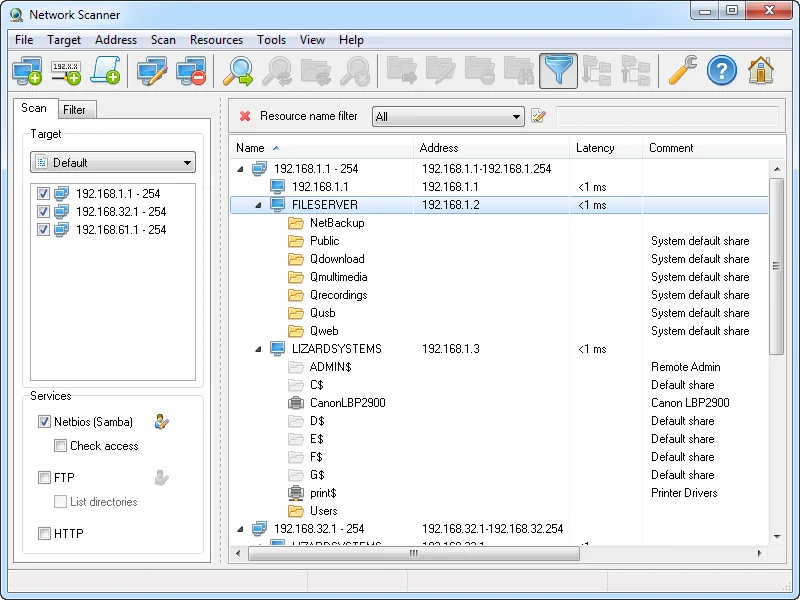
Picture the NAS in the comms cupboard that a former colleague bought for scanned invoices, still holding a share the accounts team maps every morning. It is not in Zabbix, its disks are not watched, and the first sign of trouble will be a phone call. Ping sweeps find hosts, but not which of them quietly serve files or a web admin page. LizardSystems Network Scanner is built for exactly that second question.
It is also an outlier here. Most of what we cover is open source; this is a closed-source Windows program, free for personal use and paid for business. That changes how you should evaluate it.
Use with authorization only. Scan only networks you own or administer under a written agreement, and tell your security team first. Enumerating shares and testing access with someone’s credentials is routine on your own infrastructure and a policy breach almost anywhere else.
What LizardSystems Network Scanner does
The vendor calls it an IP scanner, but its focus is narrower. You give it a list of addresses, computer names or IP ranges, including expressions such as 192.168.1-2,5,20,25-27.1-254, and it checks each host in parallel threads. A host counts as online if it answers ping or accepts a connection on ports you specify. That is a status check, not a port scan: it does not map every open service.
What it does map are shared resources. For each live host it lists NetBIOS/SMB shares, including system and hidden ones, plus FTP and web servers. It also retrieves the NetBIOS or domain computer name. Crucially, it checks read and write access for the current user or for any account you specify. Found resources open in Explorer or a browser, or map as a network drive. Results can be filtered by resource type or access rights, saved inside the program, and exported to HTML, TXT or XML. Scanning itself does not need administrator rights.
Where it helps a monitoring admin
Finding storage that never reached monitoring. Sweep your server and office ranges and sort by resource type. Compare that list with your monitoring inventory; a NAS or an old Windows box sharing a folder is exactly the kind of device whose disk will fill up unnoticed. The XML or TXT export makes the comparison scriptable.
Spotting forgotten web admin interfaces. Because it lists web servers, the same sweep surfaces the embedded management pages of UPS cards, printers, cameras and NAS units. Each is a candidate for an HTTP check in Zabbix or Checkmk, and often SNMP polling.
Checking a service account’s reach. Suppose your backup job or a monitoring check runs as a dedicated domain account. Scan the file servers with that account’s credentials and the access column shows where it can read and where it can write. Unexpected write access is a finding for the security team; missing read access can explain a failing check.
Where it falls short, and who should skip it
It has not been updated in over five years. The latest release is v21.07, published July 7, 2021. Nothing has shipped since. For software that talks SMB to every file server you own, that matters.
Windows 11 is not listed. The vendor’s supported list stops at Windows 10 and Server 2016, going back to Windows 7 and Server 2008 R2. Windows 11 and Server 2019, 2022 and 2025 are not listed. It may well run on them, but that is not a claim the vendor makes. The build is 32-bit.
It is narrow. The vendor makes no claim of MAC address or vendor detection, SNMP, IPv6 scanning or a general port scan. There is no command line for scheduled runs, and nothing is stored as history or alerted on. If you need to know which TCP ports a host exposes, Angry IP Scanner does that on Windows, macOS and Linux. If you need to see why a check fails on the wire, Wireshark is the instrument.
Skip it if your estate is Linux-first, if policy requires supported tooling on admin workstations, or if you need recurring discovery.
Who it suits
Admins of small and mid-size Windows networks who want a one-off picture of shares, FTP and web services, and of what a given account can touch, before deciding what to add to monitoring.
Licensing and cost
LizardSystems offers a Personal License, free for non-commercial use, and a Business License sold per machine. At the time of writing the business license is listed at US$79.95 per machine, perpetual, with one year of updates; check the vendor’s purchase page for current pricing. Every installation on a separate machine needs its own license.
The vendor’s pages are not fully consistent about evaluation. The product page presents personal use as free, while the FAQ describes an evaluation period for the unregistered version, limited to one computer and with nag screens, and the company page mentions a 30-day evaluation for every product. For work use, read the current EULA and FAQ and ask the vendor if anything is unclear.
How it compares
In our network discovery and troubleshooting table it sits last, after the open tools and the monitors with built-in discovery. LibreNMS, Zabbix, Checkmk and PRTG can all discover hosts on a schedule; none of them is designed to enumerate SMB shares and test access per account, which is this tool’s niche. Angry IP Scanner covers wider ground (TCP ports, three operating systems, open source) but does not check share permissions. For choosing the monitor itself, see Zabbix vs Checkmk.
Getting it safely
Get it only from the product page on lizardsystems.com. The vendor publishes a SHA-256 hash next to the Windows build; at the time of writing, for v21.07, it is 5421a6ddb26a2a9e56f7959e927d0f2158c0cfb44c55d4d2fee1c427ce63f8d6. Compare it with Get-FileHash before first run. Treat copies from listing sites as untrusted, especially for a tool you will feed domain credentials. Our where-to-get page covers hash and signature checks.
FAQ
Is LizardSystems Network Scanner open source?
No. It is closed-source software from LizardSystems, free for personal non-commercial use and licensed per machine for business use.
Does it work on Windows 11?
Windows 11 is not on the vendor’s supported list, which ends at Windows 10 and Server 2016. Test it on a non-critical machine first.
Can it scan ports or query SNMP?
It checks whether hosts are online by ping or by connecting to ports you choose, but the vendor does not describe it as a port scanner and makes no SNMP claim. Use Angry IP Scanner for TCP ports and snmpwalk from your poller for SNMP.
Can it run on a schedule and feed my monitoring system?
Not as described by the vendor: there is no command-line mode. Export to XML or TXT and compare manually, or use your monitor’s own discovery rules for recurring jobs.